From one species to its place on Earth.
Find a profile, read its evidence, then follow the places and stories that give it context.
1. Choose a starting point
The species library offers visual shortcuts such as Mammals, Birds, Reptiles, Amphibians, Insects and Plants. Open a group to browse its available profiles.
Kingdoms opens the living-world explorer on Earth, with more groups and classification context. A library shortcut is a browsing category; the groups do not all represent the same taxonomic rank. Read the rank and source when the page supplies them.
Use the library breadcrumb to return to its starting page, or Explore Kingdoms on Earth to open the explorer. These views complement each other. A group illustration or Tree of Life overview is an educational entry point, not a complete tree of every species or one universally settled classification.
2. Use the right search field
- For a name across the site, use the header’s Search species field and submit it.
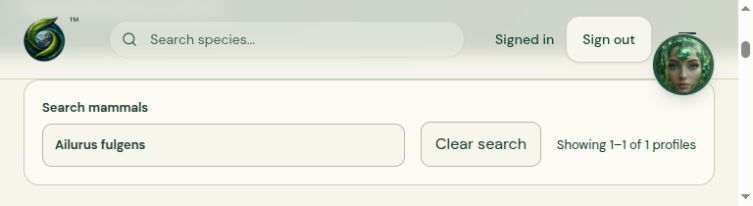
- Inside a group, use its own field, such as Search mammals. Typing updates that group’s list. Wait for Searching profiles… to change to results or a no-result message.
- Use a fuller common or scientific name to narrow a broad match. For example, Ailurus fulgens is more specific than Ailurus. A short text fragment can also occur inside other names.
- Use Clear search to restore the group list. When there are several pages, use Next page and Previous page rather than assuming the first screen contains every result.
- Open the intended card. It is an excerpt; the profile contains the longer record and any additional sources.
Counts describe available records. They are not a complete, deduplicated global species total. Similar names can refer to synonyms, different records or unresolved entries; compare the scientific name and source before treating two cards as two different species.
3. Read beyond the card
- Common and scientific names
- Check both. Common names can vary, and similar names can point to different organisms. Preserve the spelling and source shown when reporting a problem.
- Overview, habitat and diet
- These describe the retained record. Read the full section rather than relying on a clipped card excerpt. A missing field means information is not supplied there.
- Recorded range
- A region label or description supplies context. It is not automatically a complete range map, a precise point, or a live position.
- Behavior and threats
- Check the wording and source. Older inherited text can use different names, geographic descriptions or assessment terms. A threat paragraph is not necessarily the source of the status badge.
- Scientific Details
- Read the classification and any recorded traits with their units and context. A captive lifespan, for example, should not be read as a typical wild lifespan.
Some profiles remain partial or under review. If an assessment date or factual reference is absent, do not assume the page establishes today’s status. Follow an assessment or source link where supplied; otherwise record the uncertainty and use the relevant authoritative source.
4. Understand conservation labels
IUCN’s Red List assesses extinction risk. The categories are different from a population count, a local sighting or a legal protection designation. Read the assessment date and geographic scope where provided.
| Code | Category |
|---|---|
| LC | Least Concern |
| NT | Near Threatened |
| VU | Vulnerable |
| EN | Endangered |
| CR | Critically Endangered |
| EW | Extinct in the Wild |
| EX | Extinct |
| DD | Data Deficient |
| NE | Not Evaluated |
Threatened groups VU, EN and CR. EW and EX are separate categories. DD means the available information is insufficient to assess extinction risk; NE means it has not been evaluated against those criteria. Neither means Least Concern. A global category and a regional assessment can differ.
IUCN’s Red List explanation and category references →
A dated review of categories in the Red List game does not establish that every library profile has received the same review. Read the source and review information on the particular record you are using.
5. Put the record in geographic context
Find a species in a country’s retained list
- Open a country in Countries. On a phone, tap the bottom Selected bar with the country name to open its details.
- Scroll inside the country’s details to Species recorded in that country. Use Filter retained species by common or scientific name.
- Type a name, such as Northern Hairy-nosed Wombat or Lasiorhinus krefftii in Australia. Matching ignores capitalization, repeated spaces and accents. Choose a matching card to open its full profile.
- Use Clear filter to return to the list. Show more species reveals more matching entries. Choosing a different country clears the filter.
The count separates matches from all entries in that country’s retained list. No match means the catalog has no matching entry for your search; try another spelling or clear the filter. It does not prove the species is absent from that country. Filtering changes only the displayed list, not its source date or occurrence evidence.
Go from a species profile to a country
- Open the Mallard profile. In its recorded geography, open Country catalog links.
- Choose United States to open the country on the Earth explorer.
- Find Species recorded in United States in the country details. Type Mallard in the retained-species filter, then choose the matching Mallard card to return to its profile. On a narrow screen, open the record panel if it is collapsed.
Country links use Eclopidia’s retained GBIF-derived country catalog, retrieved 26 July 2026. An entry connects two records in that catalog. To establish current presence or native range, check a source that answers that question. If the list is unavailable, use Retry country links. An empty list means the retained catalog has no match for that profile.
Follow a documented species example to a story
- Open the United States map record. On a narrow screen, tap the Selected bar with the country name at the bottom to open its details.
- Under Documented species examples, choose Red Wolf. The cited example describes the northeastern North Carolina reintroduction.
- On the profile, open Red Wolf Recovery History under Related stories. To go back to the map from the profile, choose United States under Documented country examples.
Try the same path on the Indonesia map record with the Tapanuli Orangutan. Documented examples describe particular places and dates. For other countries, use the available catalog records and check their source and coverage.
Start from a region, continent or habitat
On the Southern Asia page, open the Sri Lanka Leaf-toed Gecko sample. In the profile, Explore Southern Asia on the map returns you to the region. A region link uses the record’s retained catalog label. Coverage varies by region and profile.
For other places, open the Earth explorer and choose Continents, Countries, Regions or Habitats. Search or browse that subject’s list, then check the record’s source and coverage. Some entries provide context in text only.
Occurrence is a recorded presence. Range summarizes distribution. Native, introduced and historical records are different contexts when a source distinguishes them. Missing records do not prove absence. A generalized habitat or climate layer describes an area at the source’s scale. Use the map reference to check dates, scale and gaps.
6. Find a published story
- Open Stories.
- Enter a title or topic in Find a story, or use Filter by tag. Choose Apply filters.
- Open the story title to read its full article. Check its date, author, image credit and Sources and references.
- Use a story tag to find articles with that tag. Tags are editorial topics, not taxonomic ranks or proof of a species range.
- Follow Related species where offered. Use All stories, the Stories header link or an adjacent-story link to continue browsing.
Public stories and species profiles serve different purposes. A story may discuss several species or a conservation event; a profile describes one retained record. Publication does not imply that every linked profile or claim is continuously updated. Drafts and pending editorial revisions are separate from the public edition.
For writing, media, scheduling and corrections, authorized operators can use the separate publishing desk guide.
7. Read image credits and sources
On a species profile, open Profile sources to read the references behind that record. The number in the control counts its listed sources. The panel starts closed; select it again to close it, or use Enter or Space when the control has keyboard focus. Source dates, credits, licence links and review limits are inside.
Read what each reference actually supports. A taxonomic source may support the scientific name, family, order or a basic introduction without verifying the ecological text, photograph, geographic range or a current conservation assessment. A source count is not a count of independently verified claims. The photograph’s separate credit and licence remain outside this panel.
Look for Image credit and license on a species profile, and the credit/source/license links beneath a story cover. The library landing page also has Photography & credits. A descriptive image alternative helps explain the picture; it is separate from a creator credit.
Follow the original source and licence link before planning reuse. Different images can have different terms. A displayed photo, placeholder or category illustration is not by itself proof of an identification or permission for another use. Read any resize/crop or other display-change notice with the credit.
For factual claims, look for the named reference and its date. A broad provider name in a footer is not the same as a source supporting a particular sentence. Keep uncertainties visible when the record does not supply enough detail.
8. When something is missing or conflicts
- No search match: check the group, try the full scientific name, remove an overly narrow filter, or browse Kingdoms. The absence of a page is not evidence that the organism does not exist.
- Photo coming soon: read the text and sources; the placeholder is not a picture of that species.
- Names, status or descriptions disagree: keep the exact page link, names and conflicting wording. Ask for review rather than choosing the more convenient label.
- A link or geographic connection is missing: browse the relevant Earth subject separately. Do not invent a location or assume every species has a map connection.
- A page fails: report the address, browser, exact action and visible message. Avoid sending passwords, codes or private account details.
Public records and sources can change. Keep the date of the record you relied on with your notes. For general navigation and troubleshooting, return to Start here.
Updated 11 November 2026 · English guide.